
Creating your signature
Learn how to create a signature in AnyPDFfiller — draw it in the browser, then place it on your PDF's signature line, with no printing or scanning.
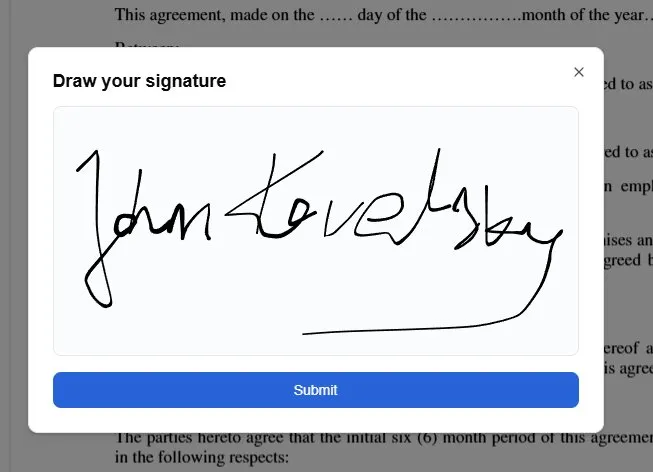
You can add a hand-drawn signature to any document in AnyPDFfiller — no printing, signing, and scanning required.
Start a signature
There are two ways to begin:
- Click the Add signature button in the main toolbar.
- Right-click the document and choose Signature from the menu.
Draw and place it
A dialog opens with a box to draw in. Sign using your mouse, trackpad, or a finger on a touchscreen, then click Submit. Move the cursor over the document to find the right spot and left-click to drop the signature in place.
Once placed, it behaves like any other field: drag it onto the signature line, pull its edges to resize it so it fits neatly, or delete it and draw again if you are not happy with it.
Tips
- Draw a little slower than you would on paper — it gives a cleaner line.
- Size the signature to sit just above the printed signature line rather than covering it.
- Filling the rest of the form too? See modifying your document, then download the finished PDF.
Drawing is the only method
There is one way to make a signature here, and it is the draw box. There is no option to type your name in a handwriting font, and no way to upload a photo or scan of your handwritten signature.
That shapes how you sign on different devices. On a phone or tablet, a fingertip gives the most natural result. On a laptop, a trackpad works but takes a steadier hand — draw slowly, and redraw if the first attempt is not clean.
Signing more than one document
Signatures are not saved between documents. If you sign a contract today and a W-9 tomorrow, you draw the signature again on the second file. To keep the two looking alike, use the same device and the same drawing speed.
Initials and dates
Many documents want more than a signature. Contracts often ask for initials on every page, and almost all of them want a date next to the signature. Both are handled the same way: drop a small text field where the initials go, and add the date next to the signature line. Work through the document once from top to bottom so you do not miss a page.
Frequently asked questions
Is a signature added here legally valid?
For most everyday documents in the US, an electronic signature is recognized — this is what the ESIGN Act and state UETA laws established. Some documents carry their own rules (wills, certain notarized filings), so follow whatever method the document itself specifies. Our post on how to sign a PDF goes into detail.
Will my signature look the same for whoever opens the file?
Yes. When you download, the signature is flattened into the page rather than sitting as a separate layer, so it renders identically in every PDF viewer.
Can I sign on my phone?
Yes — the editor runs in the mobile browser, so you can draw with a finger and download the signed file without installing anything.
What if I make a mistake?
Delete the signature and draw a new one. Nothing is final until you download the file.
Ready to start filling your PDFs?
Fill out PDF documents like a pro in minutes - no premium account needed.







