
Modifying your document
Learn how to modify a document in AnyPDFfiller — edit text and reposition, resize, or restyle the fields you've added, and delete any you no longer need.
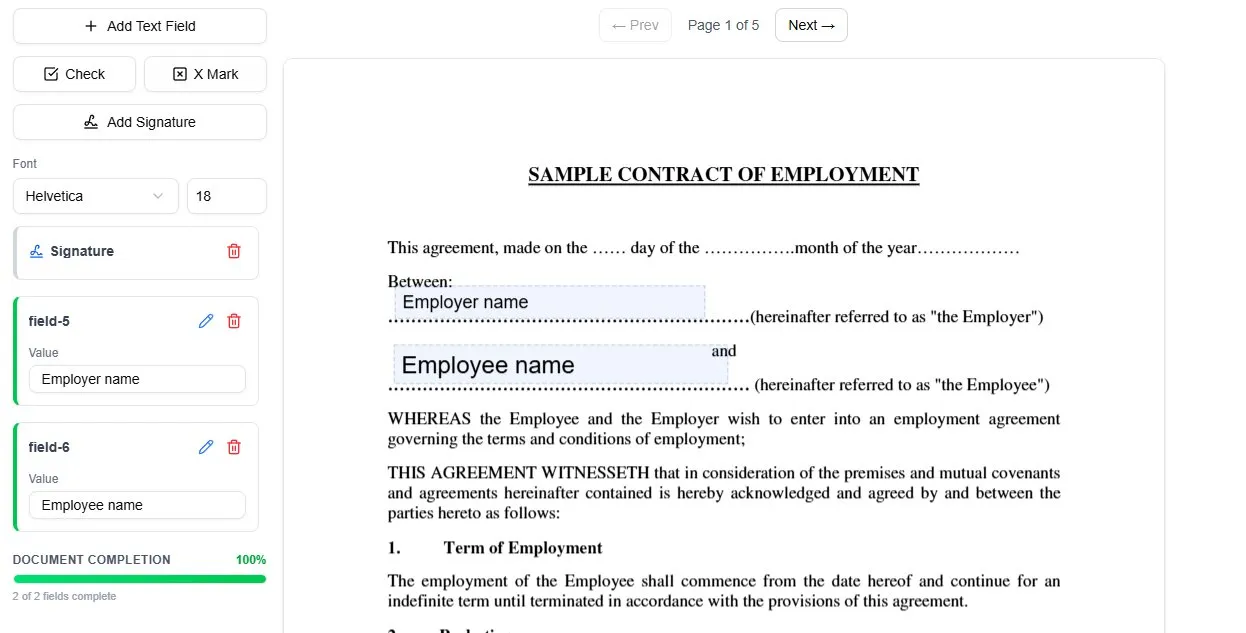
Once you have started filling a form, every element you add stays fully editable — you can rework the document until it looks exactly right before downloading.
Add to the document
You can build up your form with:
- text fields for typed answers
- check and X marks for tick-boxes
- a signature where one is needed
Adjust anything you’ve placed
Select any field to work with it. Double-click a text field to edit its contents right on the PDF, or change its Value from the panel on the left. Drag a field to reposition it, pull its edges to resize it, and remove it with the DEL key, the trash icon, or the right-click menu — so a mistake never means starting over.
Control the look
Font size and style can be set globally before you place any fields, then fine-tuned per field afterwards. That means one field can be larger or in a different style than another — handy when a title line and a small box on the same form need different sizing. If you want to clear everything and begin again, use Reset.
Ready to start filling your PDFs?
Fill out PDF documents like a pro in minutes - no premium account needed.