
Best PDF Form Filler Online – Fast Way to Fill PDF Forms
Looking for the best PDF form filler online? Compare options and see how to fill PDF forms faster, reuse data, and download clean submission-ready files.
The best PDF form filler is fast and simple.
It lets you fill forms without printing.
It saves your data for reuse.
Here is what to look for when choosing a PDF form filler online.
What makes a PDF form filler good
A good PDF form filler should:
- Work in your browser
- Support fillable and scanned PDFs
- List all fields clearly
- Create clean output files
Speed and reliability matter more than extra features.
Common problems with PDF form fillers
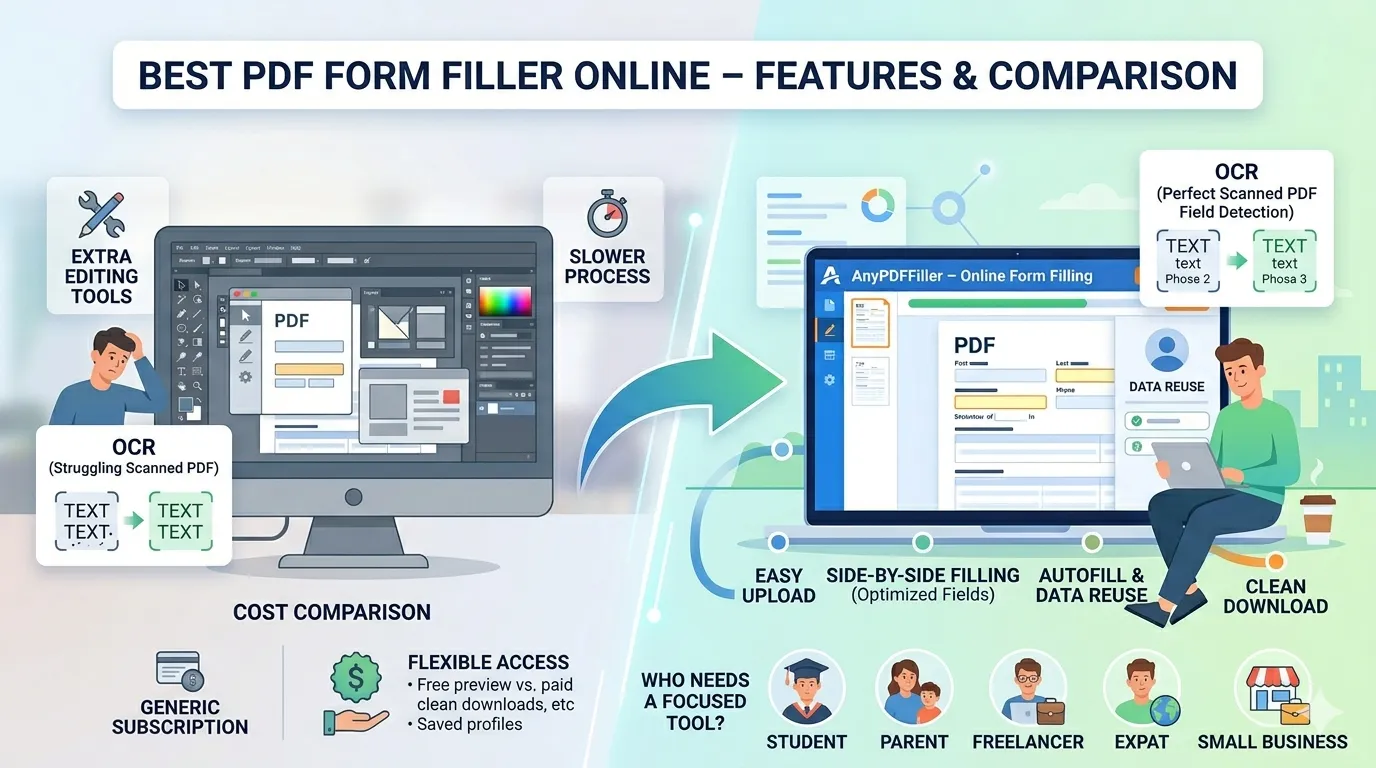
Many tools focus on editing.
They add drawing tools and layout options.
This slows down form filling.
It adds confusion instead of speed.
If your goal is submission, you need a focused tool.
Why AnyPDFfiller works better
AnyPDFfiller is built only for filling forms.
You upload a PDF.
You fill the fields side by side.
You download a clean file.
There is no layout editing.
No distractions.
Autofill and data reuse
Most PDF forms repeat the same information.
- Name
- Address
- Contact details
Save your data once.
Reuse it across all PDF forms.
This is what makes AnyPDFfiller faster than generic tools.
Works with scanned PDFs
Some PDF forms are scanned images.
AnyPDFfiller uses OCR to detect fields.
You can still fill the form online.
No printing required.
Free vs paid PDF form fillers
Many tools offer free filling with limits.
Free is fine for previews.
Paid is needed for clean downloads.
AnyPDFfiller offers:
- Free filling and preview
- Paid clean downloads
- Saved profiles
- Autofill
- Form history
A practical checklist for choosing
Run any candidate tool through these six questions:
- Does it open your real forms? Test with a flat, non-interactive PDF — many tools only handle forms that already have clickable fields.
- Can you place text anywhere? Real-world forms have lines the field detector misses; you need a click-anywhere text box.
- Is signing built in? You should be able to sign the document where you filled it, without exporting to a second tool — see how to sign a PDF.
- Does it work on your phone? Half of urgent forms arrive when you are away from a computer (iPhone walkthrough).
- Can you reuse your details? Retyping your name and address on every form is the hidden time cost.
- Is the pricing honest? Free tier that actually downloads, and a visible paid price — not a surprise paywall at the download button.
When a different tool is the better pick
No single tool is best at everything. If you need to rewrite a document’s existing paragraphs, restructure pages, or convert PDFs between formats in bulk, you want a full editor like Acrobat — that comparison is covered honestly in the Adobe alternative post. A form filler wins specifically when the document arrives finished and only needs your details, marks, and signature.
Who needs a PDF form filler
Students completing applications. Parents filling school and consent forms. Freelancers handling W-9s. Expats submitting immigration paperwork. Landlords screening tenants with rental applications. Small businesses managing onboarding forms.
If you fill PDF forms often, the right tool saves time.
Frequently asked questions
What is the best free PDF form filler?
The honest answer: the best one is whichever passes the checklist above for your forms. AnyPDFfiller’s free tier uploads, fills, signs, and downloads (with a watermark) — so you can judge it on your actual document before paying anything.
Do online form fillers work with government forms?
Yes — any standard PDF works, from IRS forms to USCIS applications. The one caveat: a few agencies require their own official filing channel or a wet-ink signature, so follow the form’s instructions.
Is it safe to type personal details into an online filler?
Your entries are kept private, and you can use the tool without creating an account. As with any sensitive document, download your copy and share it only through the channel the recipient asked for.
Upload your PDF and start filling it online now.
Ready to start filling your PDFs?
Fill out PDF documents like a pro in minutes - no premium account needed.







