
How to Annotate a PDF for Free Online (No Signup)
Annotate a PDF for free online. Add notes, checkmarks, X-marks, and a signature anywhere on the page, then download. No signup, nothing to install.

You need to mark up a PDF.
Maybe you are reviewing a document, filling in a form, or adding notes before you send it back.
You do not want to print it, scribble on it, and scan it again — and you should not have to sign up for an account just to add a checkmark.
This guide shows you how to annotate a PDF for free online, right in your browser, with no signup and nothing to install.
What you can add when you annotate a PDF
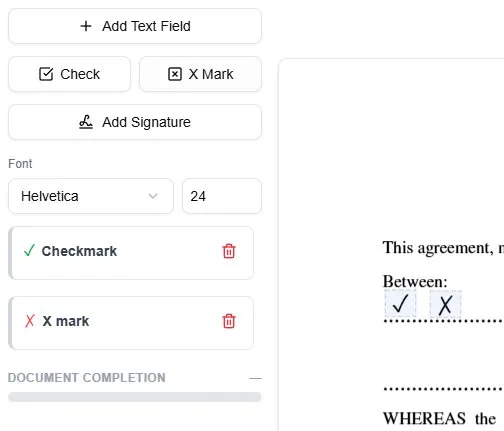
Annotating a PDF means placing your own content on top of the page without changing the original document underneath. You can add:
- Text notes anywhere on the page
- Checkmarks for boxes and approvals
- X-marks for options and corrections
- A signature to approve or sign off
That is the whole toolset. There is no highlighter, no freehand pen, and no shapes — a date, a comment, or a correction all go on as a text note. Because everything sits on top of the page, the original layout stays intact, and the result looks like a cleanly marked-up document rather than a messy scan.
How to annotate a PDF online: step by step
This works in any modern browser, on a laptop, tablet, or phone.
Step 1 — Upload your PDF
Open the tool in your browser and upload the document. It opens on screen right away. There is nothing to install, and no signup is required to start.
Step 2 — Add text notes
Click Add Text Field, then click the spot on the page where the note belongs. A box appears there; double-click it to type your note, drag it into position, and adjust the font size so it sits neatly.
Step 3 — Add checkmarks and X-marks
Place a checkmark on boxes you want to approve, and an X on options you want to flag or rule out. Drop each mark exactly where it belongs, and resize it to match the form.
Step 4 — Add a signature if you need one
If the document needs sign-off, click Add Signature, draw it in the box that opens, and click the page to place it on the line. For a full walkthrough, see our guide on how to sign a PDF.
Step 5 — Download the annotated PDF
When everything is in place, download the file. Your notes and marks are merged into the page, so the document looks the same for everyone who opens it.
Why annotate online instead of printing
Marking up a PDF on paper means printing it, writing by hand, and scanning it back — slow, and the result is often a crooked, hard-to-read scan.
Annotating online skips all of that. Your text is typed, your marks are crisp, and the file stays clean. It is the same approach as filling a form digitally — our guide on how to fill out a PDF form covers that side in detail.
It also works on documents that have no interactive fields at all, because you are layering content on top of the page rather than relying on built-in form boxes.
How to annotate a PDF on your phone
You can mark up a document without a computer.
Because the tool runs in the browser, you can open a PDF on a phone or tablet, tap to add notes and checkmarks, sign with your finger, and download the annotated copy. No app, no signup, no waiting until you are back at your desk.
Frequently asked questions
How do I annotate a PDF for free?
Upload your PDF to an online tool, then add text notes, checkmarks, X-marks, and a signature anywhere on the page. Download the annotated file when you are done, with no signup and nothing to install. The free download carries a watermark; a clean copy is paid.
Can I annotate a PDF without signing up?
Yes. You can upload a document, add notes and marks, and download the result without creating an account. The download you get free carries a watermark; removing it is what a paid plan is for.
Can I annotate a scanned PDF?
Yes. A scanned PDF is an image, so you add your notes and marks on top of the page. The result looks like a neatly marked-up document. Our scanned PDF guide covers this step by step.
Will my annotations show up for everyone?
Yes. When you download, your notes, checkmarks, and signature are merged into the page, so they appear the same way in every PDF viewer.
Can I annotate a PDF on my phone?
Yes. The tool runs in your mobile browser, so you can add notes, checkmarks, and a signature with your finger and download the finished file.
Ready to annotate your PDF?
You now know how to annotate a PDF for free online — adding notes, checkmarks, X-marks, and a signature, all in your browser with no signup. The free copy comes watermarked; a clean one is the paid step.
The fastest way to see it work is to try it on your own document.
Ready to start filling your PDFs?
Fill out PDF documents like a pro in minutes - no premium account needed.